
The File That Isn’t Really There: Understanding mmap and Page Faults
Published:
We have a fairly large file that you want to load and process, so We try to read() the file. This process is really slow. This is also wasteful if you only need parts of it. There is an alternative that lets us bring only the parts of the file our process needs, when it is needed. But before we get into that, we need to understand what happens when we read() a file.
Pages, Frames and the Disk in File Backed Memory
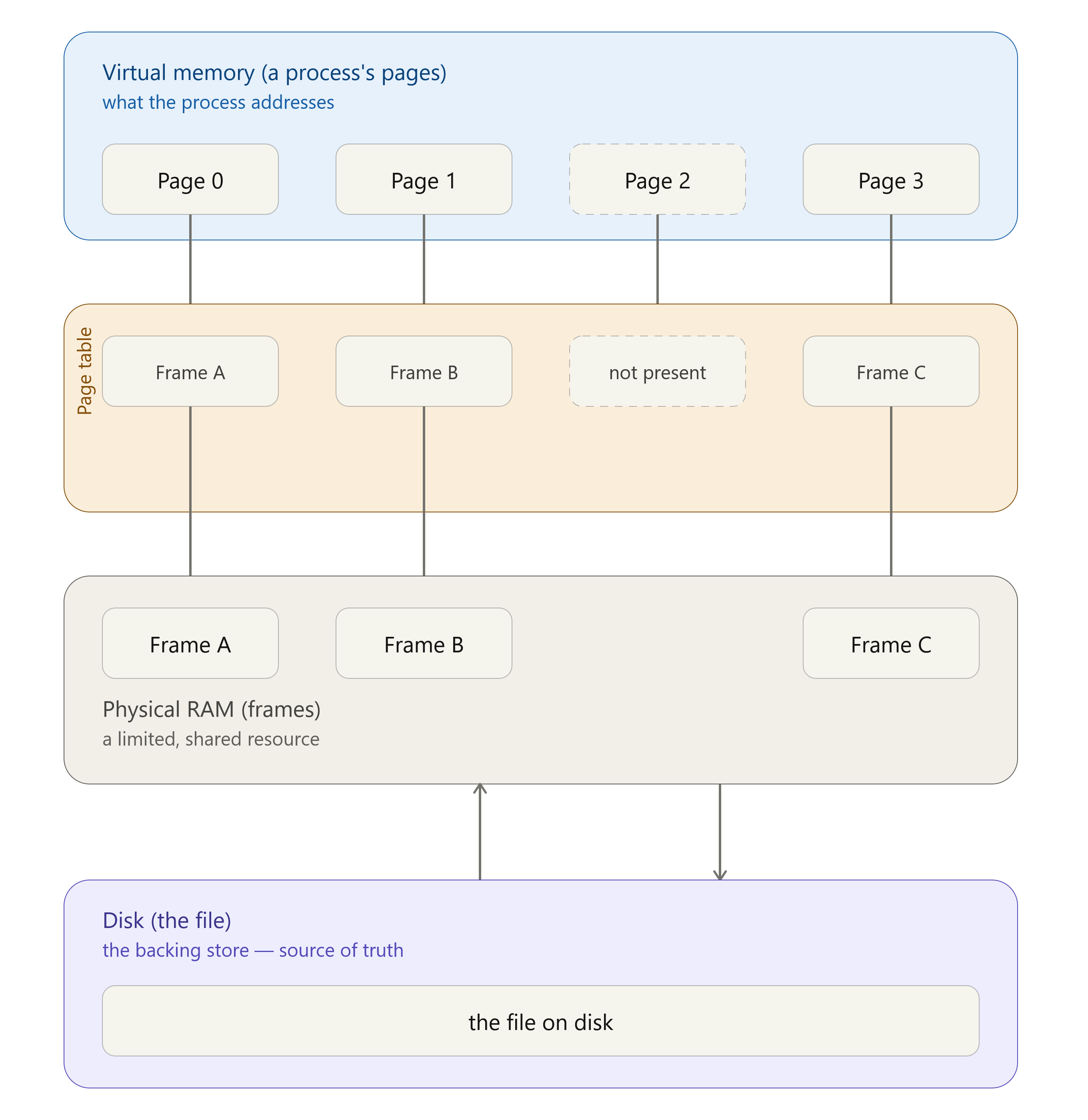
To understand how file-backed memory is managed for a process, we need to better understand how memory is handled as pages and frames.
At a high level, each process has its own virtual memory space, which gets mapped to the physical memory (your RAM). The virtual memory is organized into pages and the physical memory is organized into frames. Each process has a page table which has its view of the memory.
When a process tries to read data from the memory, it doesn’t directly pull it from the RAM. It tries to read a specific page from the virtual memory. The kernel loads data from the disk into frames, and the page table maps it to the process’s page.
If the kernel wants to free up some memory for another process, it evicts some frames from the physical memory, removes the mapping in the page tables of the processes using pages that are pointing to that frame. Any unmodified pages can be directly evicted, while modified pages need a write-back first.
The next time a process tries to get data from a specific page, the kernel realizes that the page is not mapped to a frame (a page fault), and loads the data from the disk into a frame and maps it to the page.
This is an oversimplified explanation of how pages and frames work. For a more elaborate explanation of this, check out this amazing answer on stackoverflow.
Traditional I/O
The read() we use in every program feels simple. Open a file descriptor, call read(...) and get bytes back.
int fd = open("model.bin", O_RDONLY);
char *buf = malloc(SIZE);
read(fd, buf, SIZE);
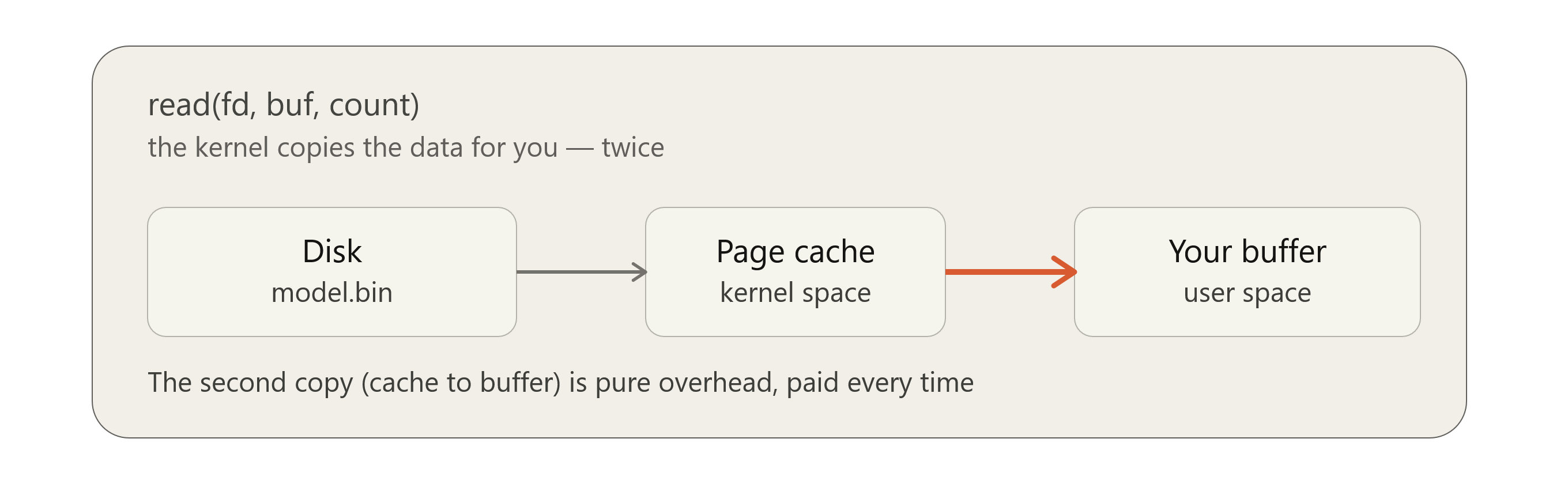
But this is what actually happens when we call read(...).
- The process does a
syscall. - The kernel checks if the requested range is already resident in the page cache. If not, it issues a block I/O request to the disk and blocks until it completes. This brings data from the disk into the physical frame, accessible only via the kernel’s own address space. This frame is what makes up the page cache.
- The data in the kernel’s space is not yet available to your process. So once the data is in the page cache, the kernel copies it again, into the buffer we passed which is another frame, but in the process’s address space.
Here we can see that any time we want to access data from a file, two copies happen, there is additional overhead from the syscall and we also need to allocate memory upfront whenever we read.
Optimizing Reads with mmap
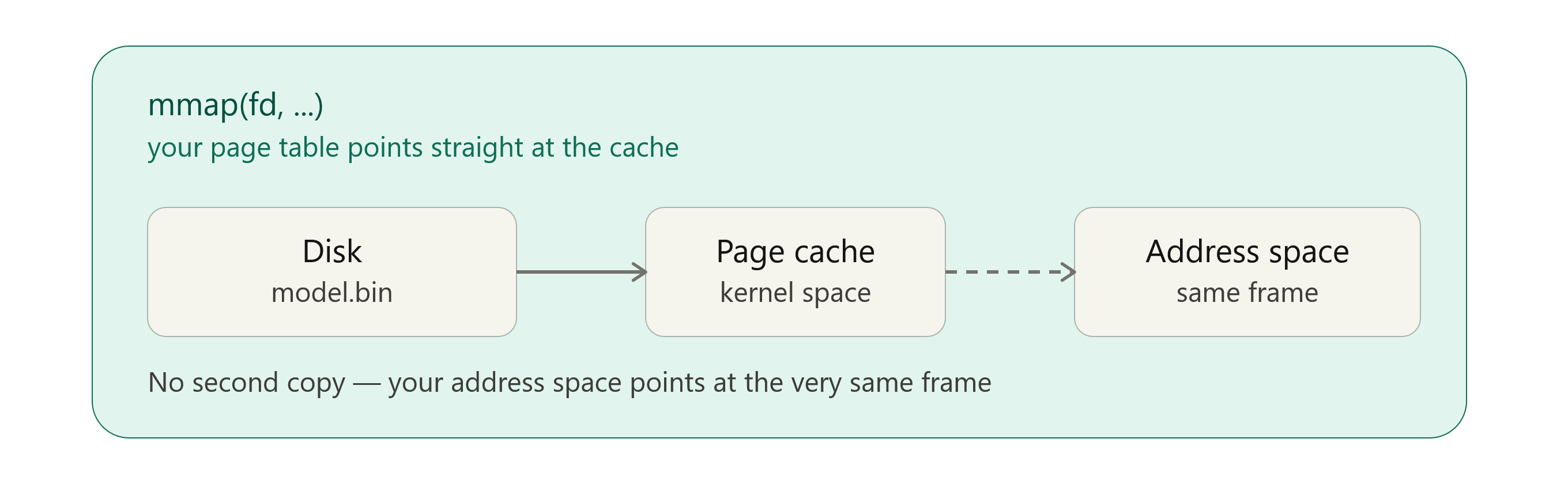
mmap is a syscall that lets you map a file into your process’s virtual address space. We first need the file’s length (usually from a quick fstat() call, which reads the file’s metadata, not its contents). mmap() then takes that length and creates page table entries mapping each page-sized chunk of our virtual address range to the corresponding offset in the file, without pointing any of them at physical memory yet. This doesn’t copy the file’s data anywhere, it just sets up the correspondence.
When we try to access a specific part of the file, the page covering that address isn’t mapped to a frame yet, so it triggers a page fault. The kernel responds by loading just that page’s worth of data from disk into a frame, then maps it. Once we’re done with it, the kernel is free to evict that frame again. This becomes really useful when we don’t need an entire large file in memory at once. We can use mmap to load just the data we’re working with, exactly when we need it. This also means that we pay the IO cost only for the pages that we actually process.
Another advantage of using mmap is that the contents of the file are not copied for each of our processes. With plain read(), every process that tries to access the same file, gets its own copy in its buffer. But with mmap, there is no copy step at all. Each processes’s page table just points its virtual addresses to the same physical frames. So if we spin up 10 workers to process the same 20 GB file, we will only need ~20 GB of RAM and not 200 GB. This only applies if none of the processes write anything to the file (in certain mapping types), in which case, a copy of that page is created specifically for that process.
Using mmap also makes it easier for the kernel to reclaim memory. Anonymous memory of the process like the process’s stack, heap or buffers has no backup. To evict them from memory, the kernel has to first copy them into the swap space (disk IO operation). If there is no swap configured, the memory cannot be evicted. The kernel then starts running out of options and ends up killing the process (OOM Killed). mmaped pages on the other hand are file backed. So the kernel can directly evict them, relying on the file to act as a backup to load the data back into memory.
Code Example
One scenario where mmap can really shine is when you have a really large Machine Learning model that you need to process. Let’s say we have a large model that we need to quantize. Depending on the quantization strategy, we might not need to load the entire model into memory at once. We might just need to process it one tensor at a time. Safetensors really lets us take advantage of mmap to do this. Let’s write a snippet that is going to load a model from a .safetensors file, iterate through each tensor in the model to quantize it.
use safetensors::SafeTensors;
use std::fs::File;
use std::path::Path;
use memmap2::Mmap;

// Define necessary helper functions and structs

pub fn quantize_safetensors_from_file(path: &Path) -> Result<Vec<QuantizedTensor>> {

    let file =
        File::open(path).with_context(|| format!("Failed to open file: {}", path.display()))?;

    // Creates the page table entries for the file.
    let mmap = unsafe { Mmap::map(&file) }
        .with_context(|| format!("Failed to memory map the file {}", path.display()))?;

    // Does not copy the tensor data into memory. Only the file headers are read and deserialized.
    // So only the file header pages are loaded into memory and all the metadata about our model
    // can be accessed. But once we start processing your tensors, they get loaded into memory when needed.
    let tensors = SafeTensors::deserialize(&mmap).with_context(|| {
        format!(
            "Failed to parse safetensors header — is this a valid .safetensors file? {}",
            path.display()
        )
    })?;

    quantize_safetensors(&tensors)
}


pub fn quantize_safetensors(tensors: &SafeTensors) -> Result<Vec<QuantizedTensor>> {
    println!("Quantizing {} tensors", tensors.tensors().len());

    let mut results: Vec<QuantizedTensor> = Vec::with_capacity(tensors.tensors().len());

    for (name, view) in tensors.tensors() {

        // Only the data needed is loaded into the memory
        // When processing this tensor, only this tensor's data is loaded into
        // memory. Once it is done processing, the kernel is free to evict that frame.

        let dtype = DType::from(view.dtype());
        let raw_bytes = view.data();
        let shape = view.shape().to_vec();
        let num_elements: usize = shape.iter().product();

        let quantized_bytes = quantize(&raw_bytes);

         results.push(QuantizedTensor {
            name,
            shape,
            data: quantized_bytes,
            num_elements,
        });
    }


    println!(
        "Done! Quantized {}/{} tensors.",
        results.len(),
        tensors.tensors().len()
    );
    Ok(results)
}
This is an example code with a bunch of oversimplifications and abstractions. If you want to see some code in action, check out a more complete implementation here. If you’re curious to know how quantization works, stay tuned for the next post.
Gotchas and Tradeoffs
Page fault latency spikes
This is the flip side of everything we’ve covered about laziness. With read(), we pay one predictable, bounded cost, at a point in our code we control. The call blocks, then returns with everything you asked for. With mmap, that same cost doesn’t disappear, it just gets redistributed: scattered across ordinary-looking memory accesses (data[i]) anywhere in our code, completely invisible at the source level. Most of those accesses are instant (the page is already cached), but occasionally one silently blocks for milliseconds while the kernel services a page fault and pulls a page off disk, and there’s no way to tell which line will be the slow one just by reading the code.
SIGBUS on truncation
This one’s unique to mmap. read() simply can’t fail this way. If we mmap a file and something (another process, or even our own code via a different fd) shrinks it afterward, any later access to the portion of our mapping that’s now past the new end-of-file delivers SIGBUS, which kills our process by default. The kernel can’t quietly fill that gap the way it does for anonymous memory, so it deliberately crashes the process.
Not a win for small files or scattered tiny reads
mmap isn’t free to set up. There’s syscall overhead to create the mapping, and critically, every single page fault is itself roughly as expensive as a syscall (it traps into the kernel, finds or evicts a frame, updates the page table). The benefit of mmap comes from avoiding many repeated copies/syscalls over a large amount of data.
For a small file (a few KB), one read() call grabbing the whole thing easily beats mmap’s setup + fault on first touch cost. And for fully random tiny reads scattered across a huge file, every access likely lands on a fresh, not yet faulted page. We end up paying close to one fault per access, each pulling in a full page just to get the handful of bytes you actually wanted, while a tuned read()/pread() per access can fetch exactly the bytes you need with more predictable overhead. mmap shines specifically for large, mostly sequential or selectively accessed data.
Alignment requirements
mmap operates in whole pages, not arbitrary byte ranges. The offset we pass to mmap() must itself be page-aligned (a multiple of the system page size). We can’t map starting at byte 1001. If we want data starting at a non-aligned offset, we map from the nearest page boundary at or before it, and add the remainder as pointer arithmetic afterward. The length also gets rounded up to the next page boundary. If our file is 4097 bytes and the system page size is 4KB, we get an 8192-byte mapping, with the tail beyond the real EOF reading back as zeros.
There are ways to mitigate these Gotchas and tradeoffs. But that is outside the scope of this post.
mmap doesn’t make reading a file faster in any absolute sense. It changes when you pay the cost, spreads it across only the pages you actually touch, and gives the kernel a way to reclaim that memory without ever touching swap. That tradeoff (lazy, demand-driven loading backed directly by a file) is exactly why formats like GGUF and safetensors are built the way they are. Both are designed as flat, page-aligned binary layouts specifically so a multi-gigabyte model can be mapped into memory almost instantly, with individual tensors paged in only when you actually need them. In a future post, we’ll dig into one of those formats and see what that design looks like in practice.